Continues Testing
Getting Started with Continuous Testing
What is Continuous Testing?
Continuous Testing is the process of regularly reviewing and validating key elements such as risks, vendors, evidence, and policies to ensure they remain accurate, effective, and compliant over time.
With Continuous Testing, you can:
- Maintain compliance – Ensure ongoing alignment with standards and policies
- Detect issues early – Identify outdated or ineffective controls
- Automate reminders – Schedule periodic reviews
- Improve accountability – Assign responsibility for recurring checks
Testing types
Continuous Testing can be applied across different areas:
- Vendor – Reassess vendor risk, compliance, and performance
- Risk – Review risk assessments and treatment effectiveness
- Evidence – Validate that supporting evidence is still valid and up to date
- Policy – Ensure policies remain relevant and properly acknowledged
Reminder cycle
Each testing activity can be scheduled based on a defined cycle:
- Monthly – Frequent checks for high-risk or critical items
- Quarterly – Regular reviews for moderate-risk areas
- Biannually – Periodic checks for lower-risk items
- Annually – Standard yearly reviews
What you see in the overview
The Continuous Testing overview provides key information such as:
- Testing type – Vendor, Risk, Evidence, or Policy
- Assigned owner – Responsible person or team
- Reminder cycle – Frequency of the review
- Next due date – Upcoming testing schedule
Tip
Align your Reminder Cycle with risk levels. For example, use Monthly reviews for high-risk items and Annually for low-risk items to optimize effort and effectiveness.
Managing Continues Test
The Continues Testing menu manages scheduled testing activities and custom events, offering a calendar view of planned and ongoing activities.
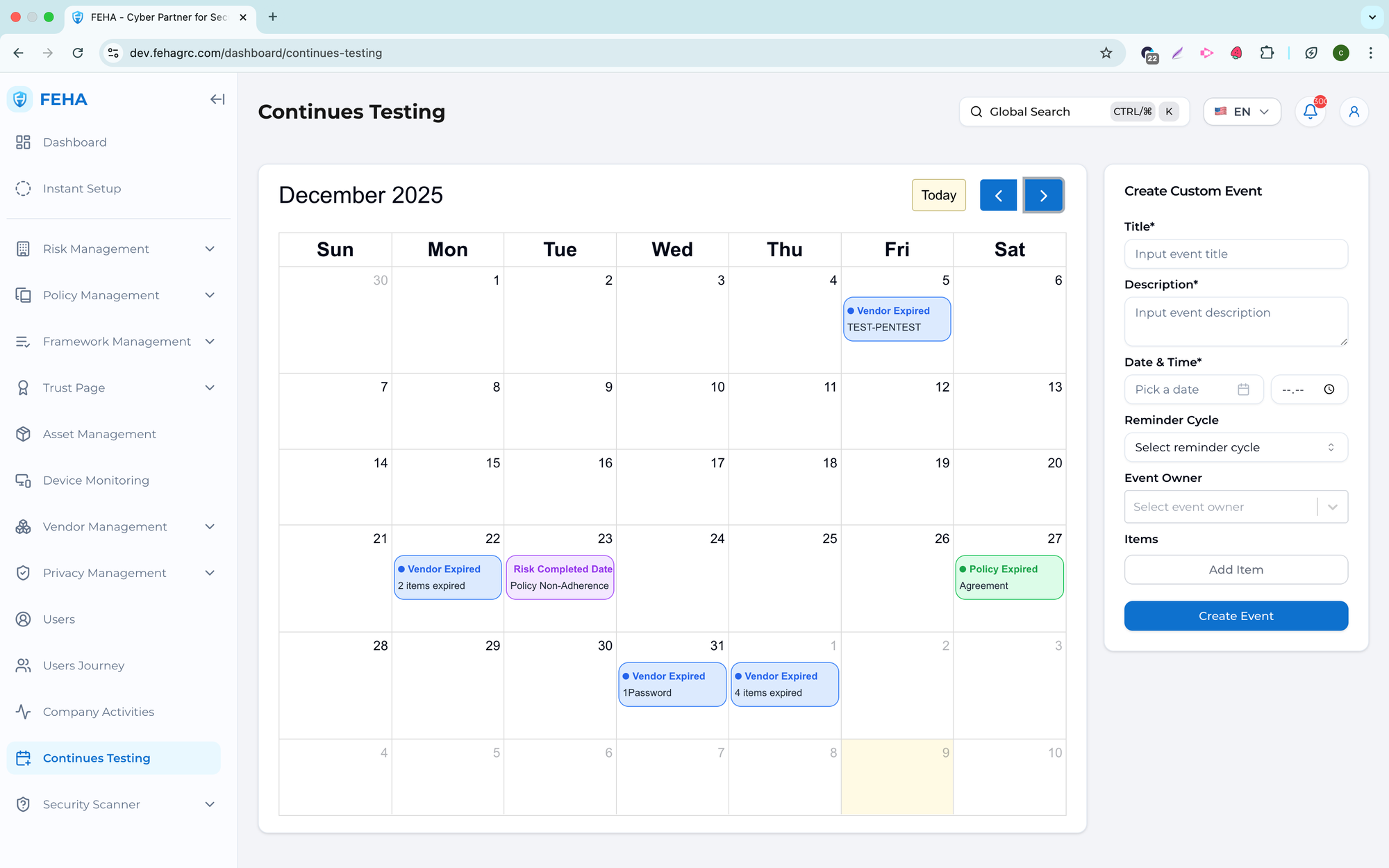
Adding a Custom Event
This section outlines the steps to create a custom testing event.
- Navigate to the Continues Testing page.
- Fill out the Create Custom Event form with the required information.
- Select Create Event to save.
Note: Custom events appear on the testing calendar once created.
Viewing Event Details
This section explains how to view details for a scheduled event.
- Navigate to the Continues Testing page.
- Select an event card on the calendar.
- Review the event information displayed in the modal.