Company Activities
Getting Started with Company Activities
What are Company Activities?
Company Activities provide a centralized log of actions and events that occur across the system. This helps organizations monitor operations, track changes, and investigate issues effectively.
With Company Activities, you can:
- Track system events – Monitor actions across all modules
- Improve transparency – See who did what and when
- Support auditing – Maintain a history of activities
- Detect issues – Identify warnings and errors quickly
Activity levels
Each activity is categorized based on its severity:
- Info – General system activity (e.g., updates, logins, changes)
- Warn – Potential issues that may require attention
- Error – Critical problems or failed operations
Modules
Activities are grouped based on the module where the action occurred:
- Company – Organization-level changes and configurations
- Control – Updates related to controls and compliance measures
- Risk – Actions involving risk identification and treatment
- General – Miscellaneous or system-wide activities
- User – User-related actions (e.g., login, role changes)
- Cron – Automated background jobs and scheduled tasks
- Vendor – Vendor-related activities and assessments
- MDM – Device management and monitoring activities
What you see in the overview
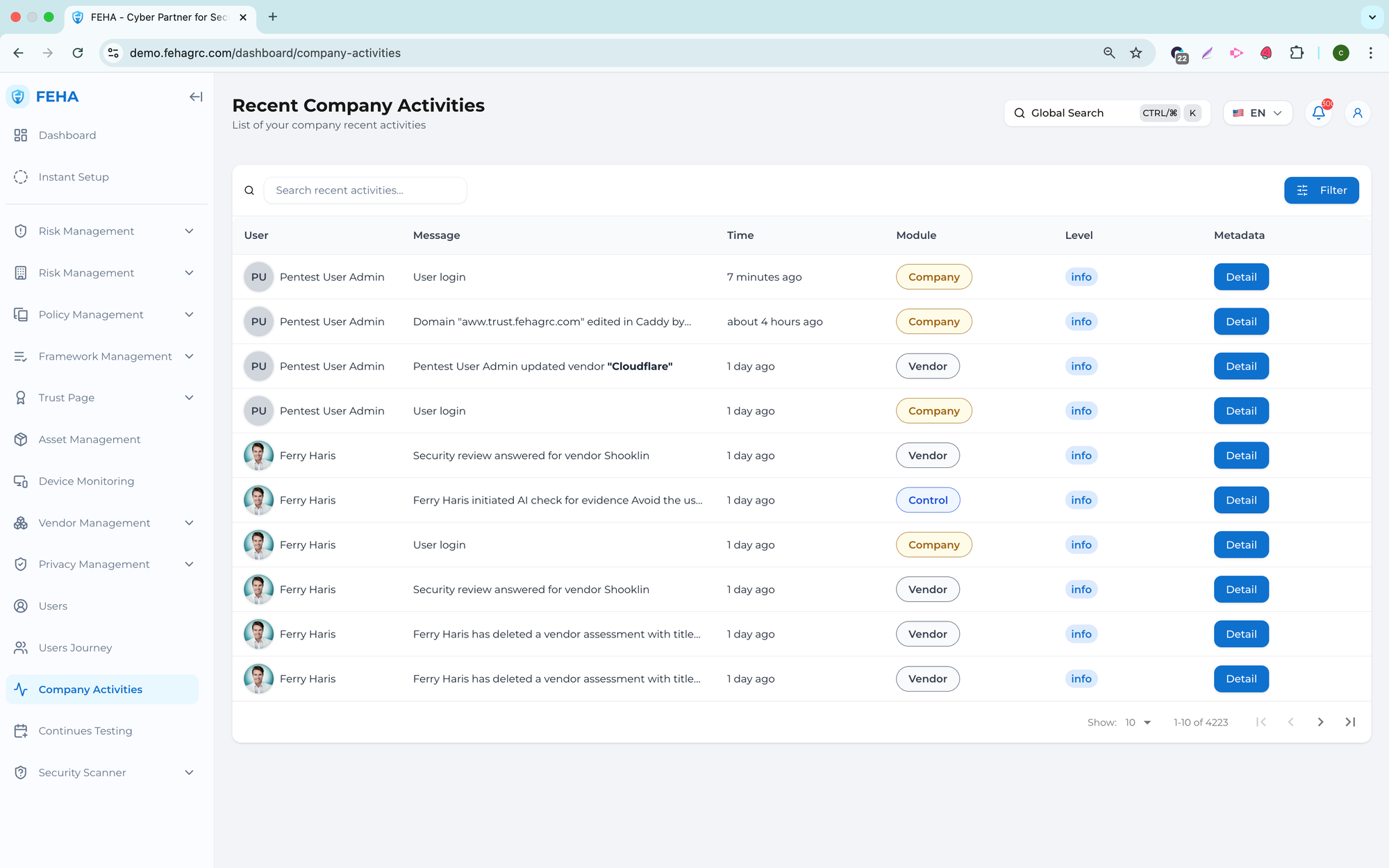
The Company Activities overview provides key details such as:
- Timestamp – When the activity occurred
- Level – Info, Warn, or Error
- Module – Source of the activity
- Description – Summary of the action
- User / system – Who or what triggered the activity
How Company Activities help
Company Activities support governance and operations by:
- Enhancing visibility – Providing a full audit trail
- Improving accountability – Tracking user and system actions
- Supporting troubleshooting – Quickly identifying issues
- Ensuring compliance – Maintaining records for audits
Tip
Pay close attention to Warn and Error levels, especially in critical modules like Risk, Control, and Vendor, as these may indicate issues that require immediate action.
Monitoring Company Activities
The Company Activities menu offers a centralized overview of system and user actions within the organization. It enables monitoring, traceability, and review of activities across the platform.
Searching Activities
This section outlines how to search for specific activities.
- Open the Company Activities page.
- Select the Search Recent Activities field.
- Enter a keyword.
- Review the list of activities that match your search.
Viewing Activity Metadata Details
This section explains how to view detailed metadata for an activity.
- Open the Company Activities page.
- Select Details on the relevant activity row.
- Review the metadata for the selected activity.
Note: Metadata offers additional context, including time and action type.
Filtering Activities
This section explains how to filter activities using available criteria.
- Open the Company Activities page.
- Select Filters.
- Select the required filter values.
- Review the list of activities that meet the selected criteria.